
Get started with Profrakt in Mystore
Get started with Profrakt in Mystore
Profrakt is an integrated shipping solution that makes it easy to manage shipments directly from the Mystore control panel. This guide takes you through setup, pricing, and daily use.
How to activate the service
It's quick and easy to get started with Profrakt:
- Navigate to
Tools > Profraktin your Mystore control panel. - Start the registration process. This only takes a few minutes.
- After registration, you will gain access to Profrakt's own Admin Panel (EDI).
If the integration does not start automatically after registration, you will find the necessary information in Profrakt's Admin Panel, or you can contact for assistance.
Pricing and invoicing
With Profrakt, you pay no fixed monthly fees for the agreement itself. You only pay for the packages you actually send.
Price examples (Mypack Collect):
- 0-5 kg: 65 kr
- 5-10 kg: 75 kr
- 10-15 kg: 95 kr
- 15-20 kg: 118 kr
- 20-25 kg: 142 kr
Invoices for shipping and any equipment are sent directly from Profrakt. Use of the integration in Mystore costs 3 NOK per order processing.
Setting up shipping methods
To use the agreed prices, you must install the correct shipping methods in the control panel.
Here's how:
- Go to
Configuration > Shipping MethodsInstall the desired method (e.g., Fixed shipping or Shipping based on weight). - To connect these to Profrakt, select
- Shipping Method > Advanced Options
Here you can link your choices at checkout to specific products from Postnord (e.g., Mypack Collect) or Bring (e.g., Parcel in mailbox).
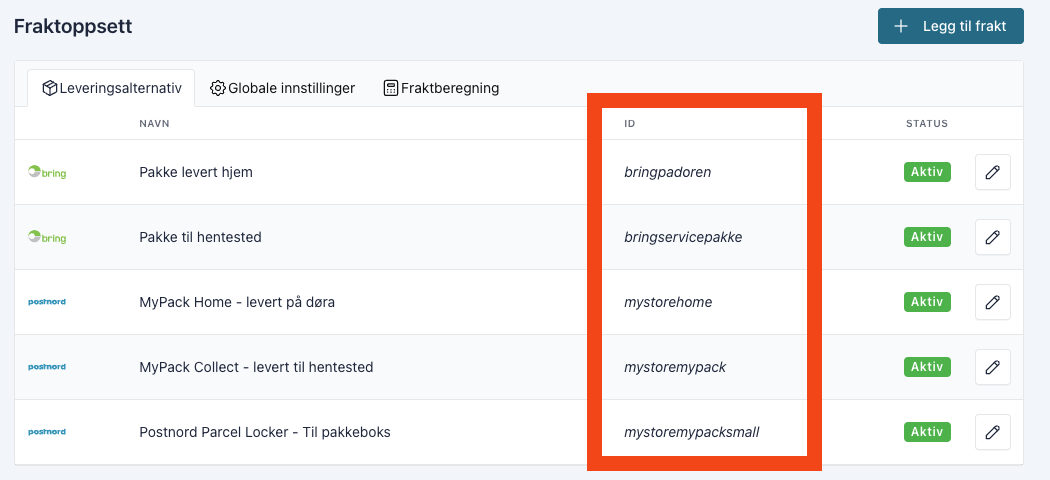
Overview of which shipping IDs can retrieve prices from Profrakt:
bringbedriftspakkebringbedriftspakkeeksbringcargogroupbringipostkassenbringipostkassen2bringpadorenbringservicepakkemystorehomemystorehomesmallmystorehomesmall2mystoremultiparcelmystoremypackmystoremypacksmallmystoreparcelprofraktgroupage
Shipping ID must not be confused with the name of the shipping method:
Printing and labels
You don't necessarily need a dedicated label printer to use Profrakt, but it significantly simplifies everyday tasks.
- Cloud printer: A Profrakt cloud printer is recommended. This automatically prints the label when you click Sent in Mystore, without you needing to download files.
- Standard printer: You can download the labels as PDF and print them on a regular office printer.
Customs Information (NVIT)
Shipments passing through Sweden or Finland – including domestic shipments within Norway – require customs information at the item line level. The Profrakt integration sends this for you.
When you select order status "Sent" or "Delivered" for an order, you will see the checkbox Include NVIT customs declaration. The field is only displayed when the shipping product you have selected supports NVIT with Bring or PostNord, and only for shipments where both sender and recipient are in Norway.
If you want to avoid checking manually, go to Extensions → Your Extensions, open the Profrakt extension and set NVIT default on to true. Then the field is pre-checked, and the customs information is also sent during bulk printing of labels, via API, and from the Order Assistant – flowing where you never see the checkbox.
This setting requires the store to run on Profrakt. If you use Logistra, it is hidden.
For the declaration to be complete, the products must have an HS code and country of origin. If something is missing, Mystore will show a red warning with the affected products – the label will be printed regardless, but the item lines will be sent with empty fields.
The warning is only available on individual orders. During bulk printing, in the Order Assistant, and via API, the customs information is sent silently, without a checkbox and without a warning.
If you don't see the checkbox, it's usually because you haven't selected a shipping product yet, because the product doesn't support NVIT in your agreement, or because the order is for international delivery. If Profrakt rejects the shipment, their error message will be displayed as "Error message:" in the EDI panel – for bulk printing, it will appear as an info icon you can hover over.
See Customs clearance of Norwegian goods in transit (NVIT) for how to register HS codes and country of origin.
Frequently asked questions (FAQ)
Getting started and registration
How do I get started? You activate the service directly in Mystore under Tools > Profrakt. The registration process itself only takes a few minutes.
What does it cost to use the service? The agreement itself is free and has no fixed monthly fees. You only pay for the packages you send. For the integration with Mystore, there is a fee of 3 NOK per order processing.
Shipping and prices
Which carriers and services are supported? Through Profrakt, you can use services from both Postnord and Bring. This includes:
- Postnord: MyPack Collect, MyPack Home, MyPack Home Small.
- Bring: Parcel in mailbox, To the door, To pickup point, and Business parcel.
How will I be invoiced? Invoices for shipping and any equipment are sent directly from Profrakt. In their Admin panel, you get a complete overview of all your shipments and costs.
Can I show my contract prices to the customer? Yes, you can choose to display your actual contract prices at checkout. This is activated under the shipping method settings in your control panel.
Labels and printing
Do I need to buy a separate label printer? No, it is not a requirement. You can download labels as PDF and use a regular office printer. For a more seamless daily routine, a Profrakt Skyprinter is recommended.
What is the advantage of a Skyprinter? A Skyprinter is connected directly to the internet. When you process an order in Mystore, the print job is sent directly to the printer regardless of the device you are working from.
Using the integration
Does Profrakt automatically send customs information (NVIT)? Yes, if you check the box for "Include NVIT customs declaration" on the order, or set "NVIT default on" in the Profrakt extension. The field requires that the shipping product supports NVIT, and that both sender and recipient are in Norway.
How is the tracking number generated? When you process an order and choose to print a label, the tracking number is automatically retrieved from Profrakt and saved to the order in Mystore.
What do I do if the integration is not working? First, check that your API key is correct in the Profrakt Admin Panel. If everything looks correct there and you are still experiencing issues, you can contact for technical assistance.