
Featured products
Featured products
With featured products, you highlight specific items on the front page of your online store. It's an easy way to give promotional products, bestsellers, or new arrivals extra attention.
How to manage featured products
Go to Products → Featured products. The page has two sections: at the top, you add products; at the bottom, you see the list of products already selected.
Everything you do here is saved continuously. There is no separate save button – if you add, remove, or move a product, the change is saved immediately.
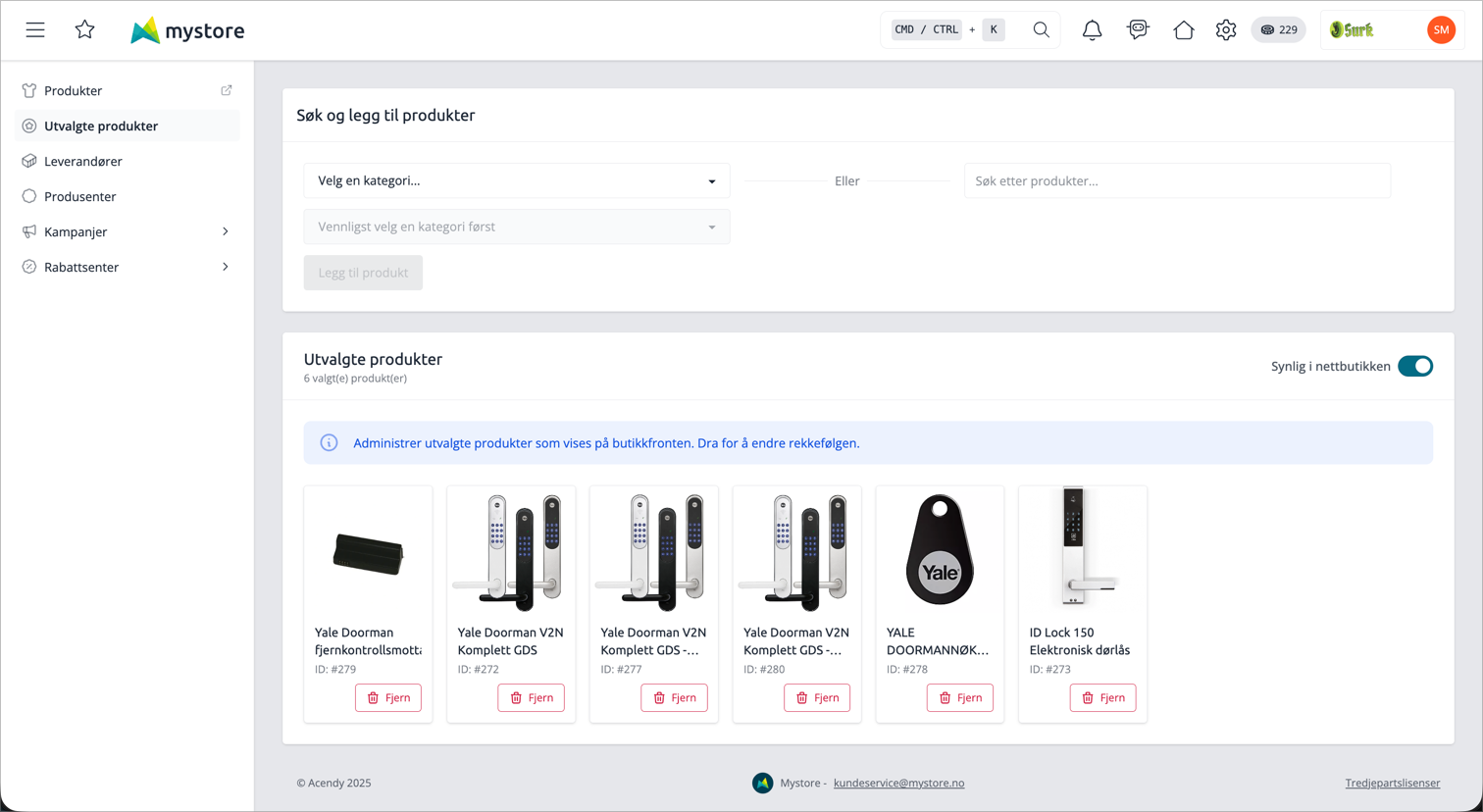
Add products
Under Search and add products, you have two ways to find products:
- Select a category from the drop-down list and add products from there.
- Search for product names in the search field (at least 2 characters).
The search allows you to check multiple products at once. Once you have selected what you want, click Add product. The products are added to the bottom of the list.
If you add a product that is already on the list, the system skips it and notifies you that the product has already been selected.
Change the order
The order in the list determines the order on the front page. Drag and drop the product cards to move them. The new order is saved immediately.
Remove products
Click Remove on the product card. The product is removed from the list immediately.
Show or hide on the front page
At the top of the list, you will find the switch Visible in the online store. It toggles the display of featured products on the front page on and off. If it's off, no featured products will be displayed on the front page – no matter how many you have added to the list.
How to control the display on the front page
Two settings determine what customers actually see:
Setting | Where | What it does |
|---|---|---|
Visible in the online store | The switch on the Featured Products page | Toggles the display of featured products on the front page on or off. |
Max display of featured products on the homepage | Homepage settings | Determines how many featured products are displayed on the front page. |
The switch Visible in the online store and the setting Show featured products on the homepage control the same thing – if you change one, the other changes.
You can add as many products as you want to the list, but the front page only shows as many as you have set in Max display of featured products on the homepage. The top products in the list are displayed first.
Tips
- Only active products are displayed on the front page. A featured product that is set to inactive is automatically removed from the front page.
- If you delete a product from the store, it also disappears from the list of featured products.
- Stock status does not affect the display – an out-of-stock product is still shown as long as it is active.