
Schema.org
Schema.org markup is structured data that helps Google understand the content of your online store. By activating this module, your online store can be displayed with more information in the search results, such as opening hours and price range.
How to set up Schema.org in Mystore
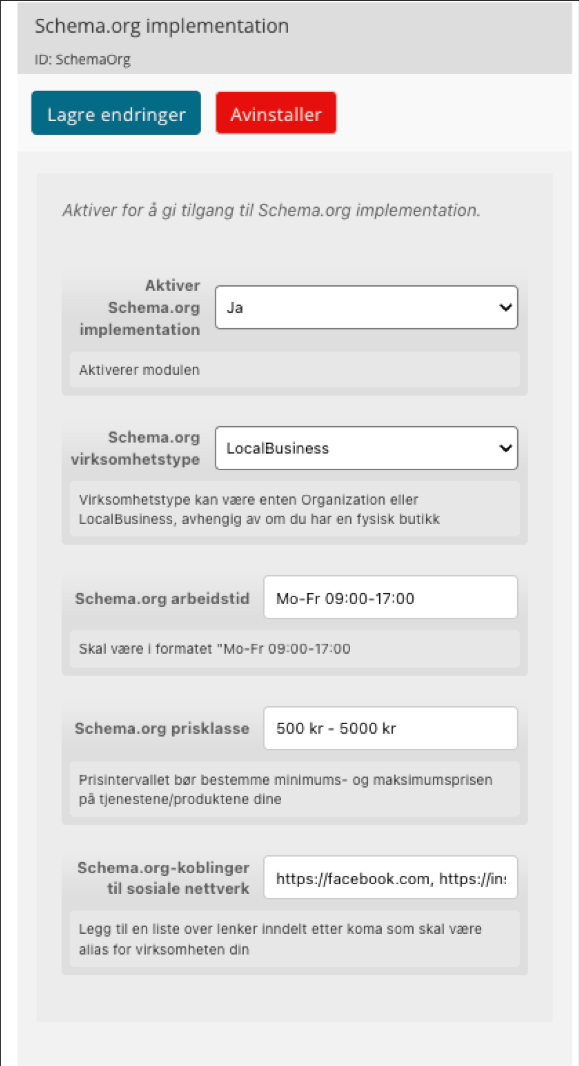
- Log in to the control panel and go to Extensions → Your Extensions. Find Schema.org implementation
- Turn on the module by activating the Activate Module-switch at the top.
- Select business type. If you have a physical store, select LocalBusiness. If you exclusively operate online retail without a physical outlet, select OrganizationFill in working hours in the correct format, for example:
- Mo-Fr 09:00-17:00Sa 10:00-15:00. If you are open several days with different hours, separate them with commas.
- Fill in price range. State the minimum and maximum price of your products or services.
- Add links to social networks by entering full URLs, separated by commas without spaces, like this:https://www.instagram.com/dinbutikk,https://www.facebook.com/dinbutikk
- Save Changes to save the settings.
What happens after activation?Your online store will now send structured data to Google with every page visit. It may take a few weeks before Google uses the data and any changes appear in search results